
How to Build an Affiliate Marketing Website with AI in 10 Minutes
Introduction
Building an affiliate marketing website is one of the most practical ways to create a long-term online asset.
Instead of only sharing affiliate links on social media, YouTube descriptions, TikTok bios, email newsletters or short posts, an affiliate marketing website gives you a central place to publish reviews, comparisons, buying guides, tutorials and blog content that can attract visitors over time.
Affiliate marketing is a business model where you promote other companies’ products or services. When someone clicks your affiliate link and completes an action such as signing up, starting a free trial, booking, purchasing or submitting a lead, you may earn a commission.
A good affiliate marketing website can help you:
- Build Trust and Credibility With Your Audience
- Increase Affiliate Conversion Rates Through Pre-Selling
- Get Approved by Better Affiliate Programs
- Generate Long-Term Free Traffic Through SEO
- Control the Customer Journey From Click to Conversion
- Track User Behavior and Optimize Performance
- Build an Email List for Long-Term Revenue
- Create ReTargeting Audiences From Interested Visitors
- Build a Long-Term Affiliate Brand
- Reduce Platform Risk and Build Owned Media
In the past, building an affiliate marketing website usually required WordPress, hosting, themes, plugins, tracking tools, SEO tools and sometimes a developer. Today, AI app builders like Base44 and Lovable allow you to build a website or web app by describing what you want in natural language.
However, you should not start with a simple prompt like:
“Build me an affiliate website.”
A better approach is to follow a clear process.
This guide will show you how to build an affiliate marketing website with Base44 or Lovable, from choosing your niche and planning your sitemap to creating the database, admin dashboard, blog management system, affiliate click tracking and SEO structure.
Overview: How to Build an Affiliate Marketing Website with Base44 or Lovable
To build an affiliate marketing website that can grow over time, you should follow 10 main steps:
- Understand what an affiliate marketing website is
- Choose your affiliate niche
- Define your website positioning
- Create the affiliate website sitemap
- Design the database in ChatGPT or Claude
- Choose the right AI website/app builder
- Build the affiliate marketing website with Base44 or Lovable
- Complete the main page templates
- Create the admin dashboard, blog management, click tracking, SEO settings and trust pages
- Test, publish and grow the website after launch
The full workflow looks like this:
Understand the model → Choose a niche → Define positioning → Create sitemap → Design the database in ChatGPT/Claude → Choose the AI builder → Build the website in Base44/Lovable → Complete page templates → Improve admin/blog/tracking/SEO/trust → Test and publish.
The key point is:
Use ChatGPT or Claude for strategy, planning, structure and prompt preparation.
Use Base44 or Lovable to actually build the affiliate marketing website or web app.
In this guide, each prompt will clearly show where to use it:
- Enter this prompt into ChatGPT or Claude: use it for analysis, ideation, sitemap planning, database design or content planning.
- Enter this prompt into Base44 or Lovable: use it to build the actual website, pages, dashboard, tracking and app features.
A Simpler Way: Use Plan Mode in Base44 or Lovable
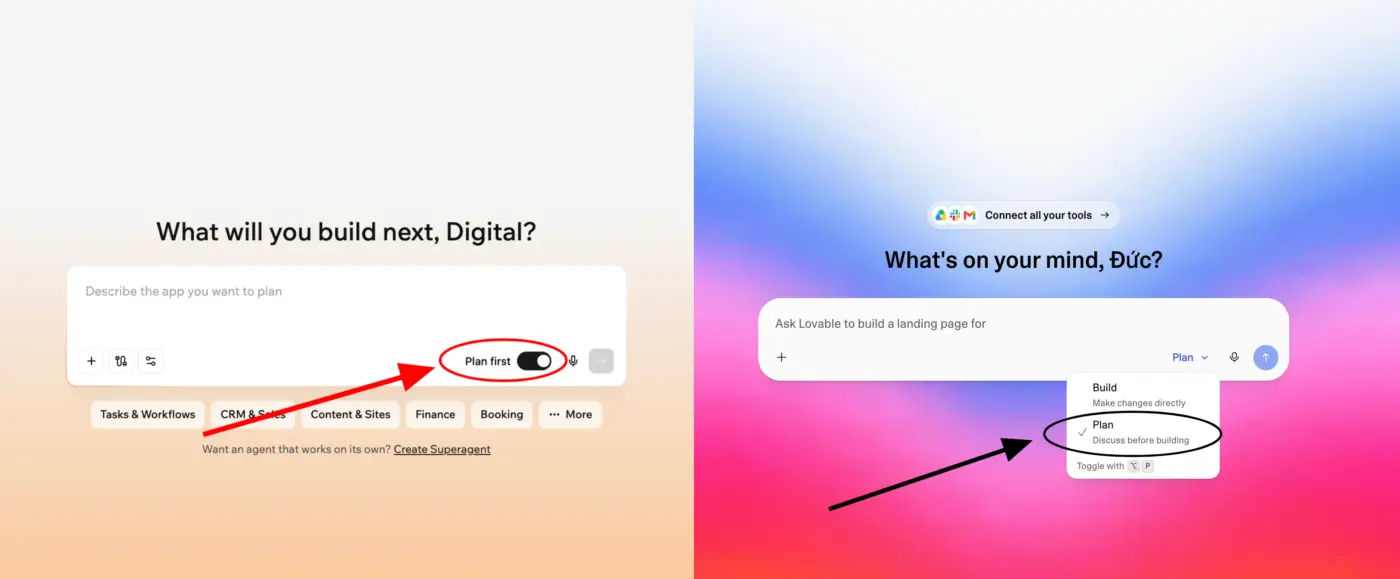
First, if you prefer simplicity, you can turn on Plan Mode in Base44 or Lovable, then enter a simple prompt such as:
I want to build an affiliate marketing website for [insert your niche].
For example:
I want to build an affiliate marketing website for AI tools.
Or:
I want to build an affiliate marketing website for web hosting and website builders.
After that, just answer a few questions from Base44 or Lovable, and the AI builder can help you create the first version of your affiliate marketing website.
This is a good option if you want to move fast and do not want to think too much about sitemap, database, page templates, admin dashboard and tracking logic at the beginning.
However, if you want to clearly understand a repeatable process, make sure to read the sections below carefully.
The step-by-step workflow will help you understand how to build an affiliate marketing website in a more structured way, from niche selection and positioning to sitemap, database, admin dashboard, blog management, affiliate click tracking, SEO settings and launch.
Step 1: Understand What an Affiliate Marketing Website Is
An affiliate marketing website promotes, reviews, compares or explains third-party products and services. When a reader clicks your affiliate link and completes an action, you may earn a commission.
Affiliate marketing websites can be built in many niches:
- Web hosting
- Website builders
- SaaS tools
- AI tools
- Personal finance
- Credit cards
- Loans
- Insurance
- Crypto platforms
- Travel booking
- Online education
- Courses
- Home products
- Beauty
- Health and fitness
- Baby products
- Consumer electronics
- Ecommerce tools
- Business software
A good affiliate marketing website is not just a place to paste links. It should help readers understand their problem, compare solutions and make a better decision.
In simple terms:
A good affiliate marketing website helps readers choose the right product, and you earn commissions by recommending useful solutions.
For example, if you build an affiliate marketing website in the web hosting niche, readers do not only need a “buy hosting” button. They need to understand:
- Which hosting is best for beginners?
- Which hosting is best for small business websites?
- Which hosting is affordable but still reliable?
- Which hosting is best for WordPress?
- How do Hostinger, Bluehost and SiteGround compare?
Your website should help readers answer these questions before they click an affiliate link.
Step 2: Choose Your Affiliate Niche
Before building the website, you need to choose a niche.
A strong affiliate niche should have:
- Real market demand.
- Products or services with affiliate programs.
- Users who are willing to spend money.
- Enough topics for long-term content creation.
- Multiple products to review and compare.
- Search demand.
- Attractive commission potential.
- A clear target audience.
- A reasonable level of competition.
Examples:
- Web hosting and website tools
- SaaS and business software
- Personal finance
- Credit cards and loans
- Insurance
- Crypto
- Online education
- Travel
- Physical products
- Beauty
- Health and fitness
- Baby products
- Consumer electronics
- Home products
The output of this step should be a clear sentence:
My affiliate marketing website niche is: [insert niche]
Example:
My affiliate marketing website niche is: web hosting and website tools for beginners starting an online business.
Prompt to Choose Your Affiliate Niche
Enter this prompt into ChatGPT or Claude.
Use this prompt for niche research and analysis before going into Base44 or Lovable. Do not enter this prompt into Base44/Lovable yet.
I want to build an affiliate marketing website for the US/UK market.

Help me choose a profitable affiliate niche based on these criteria:
1. Real market demand.
2. Products or services with affiliate programs.
3. Ability to create many reviews, comparisons and buying guides.
4. Users who are willing to spend money.
5. Attractive commission potential.
6. Long-term SEO and content opportunities.
7. Suitable for beginners to start.

Please suggest:
- 10 potential affiliate niches.
- Pros and cons of each niche.
- Products or services I can promote.
- Target audience.
- Competition level.
- Monetisation potential.
- Which niche I should prioritise for a long-term affiliate website.
Step 3: Define Your Website Positioning
After choosing the niche, define who your affiliate marketing website is for and what problem it helps solve.
The same niche can produce very different websites depending on positioning.
Example in the hosting niche:
- For beginners: “simple hosting guidance for first-time website owners.”
- For agencies: “high-performance hosting for client websites.”
- For ecommerce founders: “hosting and website tools for online stores.”
Without clear positioning, your affiliate marketing website may become too generic. You may be able to write many articles, but the website will not feel differentiated.
You need to answer:
- Who is this website for?
- What problem are they trying to solve?
- What products does the website help them choose?
- What is the core promise of the website?
- How is this website different from other affiliate websites?
Output:
Niche: [chosen niche]
Target audience: [who]
Website positioning: [who the website helps and how]
Core promise: [what result readers get]
Example:
Niche: Web hosting and website tools
Target audience: Beginners starting an online business
Website positioning: Helping beginners choose the right hosting, domain and website tools to start an online business more easily.
Core promise: Helping readers choose the right tools, save money and avoid buying the wrong hosting or website builder.
Prompt to Define Website Positioning
Enter this prompt into ChatGPT or Claude.
Use this prompt to define positioning, messaging and content direction. Do not enter this prompt into Base44/Lovable yet.
I want to create an affiliate marketing website for the US/UK market.

Niche:
[insert your niche]

Target market:
US and UK

Target audience:
[beginners / small business owners / freelancers / parents / travellers / students / creators / professionals]

Products to promote:
[list product or service categories]

Help me define:
1. Main positioning.
2. Core promise.
3. 5 messaging angles.
4. Main content categories.
5. Types of pages.
6. Differentiation strategy.
7. Homepage hero headline and subheadline.
Step 4: Create the Affiliate Marketing Website Sitemap
After defining your positioning, create the website structure.
The sitemap should not be random. It should reflect:
- Your chosen niche.
- Your target audience.
- The products you want to promote.
- The reader’s decision-making journey.
Basic structure:
/
├── categories/
├── reviews/
├── comparisons/
├── best/
├── blog/
├── go/
├── about/
├── affiliate-disclosure/
├── review-methodology/
├── privacy-policy/
├── cookie-policy/
└── contact/
Meaning:
- Homepage: explains your website positioning.
- Category pages: group products by category or problem.
- Review pages: detailed reviews of individual products.
- Comparison pages: compare two or more products.
- Best pages: commercial-intent buying guides.
- Blog/tutorial pages: educational content for SEO and trust.
- Go pages: internal affiliate redirect links like
/go/hostinger. - Affiliate Disclosure: explains that the website may earn commissions.
- Review Methodology: explains how products are evaluated.
- Privacy Policy and Cookie Policy: important for user trust and compliance, especially in US/UK markets.
Example for the hosting niche:
/
├── hosting/
├── website-builders/
├── reviews/
│   ├── hostinger-review/
│   ├── bluehost-review/
│   └── siteground-review/
├── comparisons/
│   ├── hostinger-vs-bluehost/
│   └── hostinger-vs-siteground/
├── best/
│   ├── best-hosting-for-beginners/
│   ├── best-wordpress-hosting/
│   └── best-cheap-hosting/
├── blog/
├── go/
├── about/
├── affiliate-disclosure/
├── review-methodology/
├── privacy-policy/
├── cookie-policy/
└── contact/
Prompt to Create the Sitemap
Enter this prompt into ChatGPT or Claude.
Use this prompt to create the sitemap and website architecture before building. Do not enter this prompt into Base44/Lovable yet.
Create the information architecture for an affiliate marketing website targeting the US/UK market.

Use the niche and positioning from the previous steps.

Website niche:
[insert niche]

Website positioning:
[insert positioning]

Target audience:
[insert target audience]

Main affiliate products:
[list product categories]

The website should include:
1. Homepage
2. Category pages
3. Product review pages
4. Product comparison pages
5. Best products pages
6. Blog/tutorial pages
7. About page
8. Affiliate disclosure page
9. Review methodology page
10. Privacy policy page
11. Cookie policy page
12. Contact page
13. Internal affiliate redirect pages: /go/:productSlug

Internal/admin pages:
1. Admin dashboard
2. Product/offer management
3. Category management
4. Review management
5. Comparison management
6. Best list management
7. Blog management
8. Blog category management
9. CTA management
10. Click tracking report
11. Site settings

Please create:
- A clear sitemap.
- The minimum MVP version.
- The recommended version for long-term growth.
- The URL structure for SEO.
Step 5: Design the Database in ChatGPT or Claude
After creating the sitemap, design the database for your affiliate marketing website.
At this step, you should not build the database inside Base44 or Lovable yet. This step should be done in ChatGPT or Claude first so you have a clear database blueprint.
ChatGPT or Claude acts like the architect. It helps you define:
- Which entities/tables the website needs.
- What fields each entity should have.
- How the entities relate to one another.
- Which fields are needed for SEO.
- Which fields are needed for affiliate tracking.
- Which fields should appear in the admin dashboard.
- Which fields are needed to manage and publish blog posts.
After you have the database structure, you will copy it into Base44 or Lovable when building the website.
Core entities:
- Products: product data, affiliate URL, benefits, pros/cons, CTA.
- Categories: product categories.
- Reviews: product review pages.
- Comparisons: product comparison pages.
- BestLists: best products buying guides.
- BlogPosts: blog and tutorial content.
- BlogCategories: blog categories.
- AffiliateClicks: outbound affiliate click events.
- CTAs: CTA text and placement.
- SiteSettings: global website settings.
Prompt to Design the Database
Enter this prompt into ChatGPT or Claude.
Use this prompt to design the database first. Do not enter this prompt into Base44/Lovable. After ChatGPT/Claude returns the database structure, copy only the final database structure into Base44/Lovable in Step 7.
I am building an affiliate marketing website for the US/UK market.

Website niche:
[insert niche]

Website positioning:
[insert positioning]

Sitemap:
[paste sitemap from the previous step]

Please design the database for this affiliate marketing website.

Requirements:
1. List all necessary entities/tables.
2. For each entity, list the required fields.
3. Explain the purpose of each entity.
4. Define relationships between entities.
5. Identify required fields.
6. Identify SEO fields.
7. Identify affiliate tracking fields.
8. Identify which fields should appear in the admin dashboard.
9. Identify which fields are needed for the blog management system.
10. Then rewrite the database structure in a clean format that I can copy into Base44 or Lovable in the next step.
The output of this step should look like this:
Database structure:
- Products
- Categories
- Reviews
- Comparisons
- BestLists
- BlogPosts
- BlogCategories
- AffiliateClicks
- CTAs
- SiteSettings

Relationships:
- One category has many products.
- One product can have one main review.
- One product can appear in many best lists.
- One product can appear in many comparisons.
- One product can have many affiliate clicks.
- One product can have many CTA buttons.
- One blog category has many blog posts.
- One blog post can link to many products, reviews, comparisons and best product pages.
This step is only for database planning. You are not implementing the real database inside Base44 or Lovable yet. Implementation happens when you build the website.
Step 6: Choose the Right AI Website/App Builder
After you have the niche, positioning, sitemap and database structure, choose the right tool to build the affiliate marketing website.
Two tools you can consider are Base44 and Lovable. Both can help you create websites or web apps with AI, but they fit different needs.
When Should You Choose Base44?
Choose Base44 when you need to create an MVP as quickly as possible with the least amount of technical setup.
Base44 is a good fit if you are validating an idea over days or weeks, want a managed all-in-one environment, and do not want to manually configure too much backend, database, hosting or authentication.
For an affiliate marketing website, Base44 is suitable when you want to quickly create a system to test a niche, manage affiliate products, manage affiliate links, build an internal dashboard and track basic clicks.
In simple terms:
Choose Base44 if your top priority is speed, minimal setup and fast idea validation.
When Should You Choose Lovable?
Choose Lovable when your prototype is not just a quick test, but may become a real product in the future.
Lovable is a good fit if you want a developer to continue working on the codebase, need deeper integrations with tools like Stripe, Clerk, Supabase or external APIs, or you are building something where vendor lock-in could become a serious business risk.
For an affiliate marketing website, Lovable is suitable when you want a more polished user experience, better design, and the ability to add quizzes, calculators, product finders, client portals or grow the site into a long-term SaaS/content platform.
In simple terms:
Choose Lovable if you want to build an affiliate marketing website that can scale, be handed off to developers and grow into a long-term product.
If you want to learn more about the differences between Base44 and Lovable, read the full comparison here: https://bestainetwork.com/base44-vs-lovable/
Step 7: Build the Affiliate Marketing Website with Base44 or Lovable
After choosing the right tool in Step 6, you can start building the actual website.
At this step, paste all outputs from the previous steps into your build prompt:
- Niche from Step 2.
- Positioning from Step 3.
- Sitemap from Step 4.
- Database structure from Step 5.
- Chosen app builder from Step 6.
Unlike the prompts in Steps 2, 3, 4 and 5, the prompts in Step 7 are used to build the actual website, so enter them into Base44 or Lovable, not ChatGPT/Claude.
Prompt for Base44
Enter this prompt into Base44.
Use this prompt to create the actual website/app in Base44.
Create an English affiliate marketing website with an admin dashboard for the US/UK market.

Use the niche, positioning, sitemap and database structure defined in the previous steps.

Website niche:
[insert niche]

Website positioning:
[insert positioning]

Target audience:
[insert target audience]

Use this sitemap:
[paste sitemap]

Use this database structure:
[paste database structure from ChatGPT/Claude]

Please implement these entities, fields, relationships, admin forms and public data connections.

Main products/services to promote:
[list product categories]

Build an MVP with:

1. Public affiliate website:
- Homepage
- Category pages
- Product review pages
- Product comparison pages
- Best products pages
- Blog listing page
- Blog detail page
- About page
- Affiliate disclosure page
- Review methodology page
- Privacy policy page
- Cookie policy page
- Contact page
- Internal redirect route: /go/:productSlug

2. Admin dashboard:
- Admin login
- Product/offer management
- Category management
- Review management
- Comparison management
- Best products management
- Blog post management
- Blog category management
- CTA management
- Click tracking reports
- Site settings

Important rules:
- Use /go/:productSlug for affiliate redirects.
- Track affiliate clicks before redirecting.
- Draft content should not be publicly visible.
- Product must have affiliate_url before publishing.
- Blog posts should be Draft by default.
- Blog posts must support Draft, Published and Archived status.
- Only Published blog posts should appear on the public website.
- Use English UI labels.
- Use rel="sponsored" for affiliate links where applicable.
- One category has many products.
- One product can have one main review.
- One product can appear in many best lists.
- One product can appear in many comparisons.
- One product can have many affiliate clicks.
- One product can have many CTA buttons.
- One blog category has many blog posts.
- One blog post can link to many products, reviews, comparisons and best product pages.

Design:
- Clean, modern, trustworthy.
- Mobile-friendly.
- SEO-friendly.
- Conversion-focused but not aggressive.

Build the MVP first.
Do not add public user accounts, comments, payment or newsletter automation yet.
Prompt for Lovable
Enter this prompt into Lovable.
Use this prompt to create the actual website/app in Lovable.
Build a full-stack English affiliate marketing website for the US/UK market.

Use the niche, positioning, sitemap and database structure defined in the previous steps.

Website niche:
[insert niche]

Target audience:
[insert target audience]

Brand positioning:
[insert positioning]

Use this sitemap:
[paste sitemap]

Use this database structure:
[paste database structure from ChatGPT/Claude]

Please implement these entities, fields, relationships, admin forms and public data connections.

Main goal:
Help users choose the right products/services through helpful reviews, comparisons, buying guides and tutorials.

Public website pages:
1. Homepage
2. Category listing pages
3. Product review page template
4. Product comparison page template
5. Best products page template
6. Blog listing page
7. Blog detail page template
8. About page
9. Affiliate disclosure page
10. Review methodology page
11. Privacy policy page
12. Cookie policy page
13. Contact page
14. Internal redirect route: /go/:productSlug

Admin dashboard:
1. Login required
2. Product/offer management
3. Category management
4. Review management
5. Comparison management
6. Best list management
7. Blog post management
8. Blog category management
9. CTA management
10. Click tracking report
11. Site settings

Important features:
- Use /go/:productSlug for affiliate redirects.
- Track affiliate clicks before redirecting.
- Draft content should not be publicly visible.
- Product must have affiliate_url before publishing.
- Blog posts should support Draft, Published and Archived status.
- Only Published blog posts should appear on the public website.
- Each public page should have title, meta description, canonical URL and OG image fields.
- Review pages should include pros, cons, pricing summary, use cases and final verdict.
- Comparison pages should include decision box, comparison table and recommendation.
- Blog posts should support related products, related reviews, related comparisons and CTA sections.
- Add affiliate disclosure near CTA sections.
- Use rel="sponsored" for affiliate links where applicable.
- One category has many products.
- One product can have one main review.
- One product can appear in many best lists.
- One product can appear in many comparisons.
- One product can have many affiliate clicks.
- One product can have many CTA buttons.
- One blog category has many blog posts.
- One blog post can link to many products, reviews, comparisons and best product pages.

Design:
- Modern, clean and trustworthy.
- Conversion-focused but not aggressive.
- Mobile responsive.
- English UI labels and content.

Build the MVP first.
Do not add public user accounts, comments, payment or newsletter automation yet.
Step 8: Complete the Main Page Templates
After the AI creates the MVP, improve each main page type.
The prompts in this step are used to edit or create pages inside the actual website, so enter them into Base44 or Lovable, depending on the tool you chose.
Homepage
The homepage should include:
- Hero section
- Featured categories
- Top recommended products
- Latest reviews
- Popular comparisons
- Best product guides
- Latest blog posts
- Affiliate disclosure
Prompt to Improve the Homepage
Enter this prompt into Base44 or Lovable.
Create a modern English homepage for this affiliate marketing website.

Use the website positioning, categories and product database from the previous steps.

Sections:
1. Hero section
2. Featured categories
3. Top recommended products
4. Latest reviews
5. Popular comparisons
6. Best product guides
7. Latest blog posts
8. Affiliate disclosure

CTA buttons:
- “Explore Best Products”
- “View Latest Comparisons”
Review Page
A review page should include:
- Review hero
- Quick verdict box
- Table of contents
- Key features
- Benefits
- Pros and cons
- Pricing summary
- Alternatives
- Final verdict
- CTA
- FAQ
Prompt to Improve the Review Page
Enter this prompt into Base44 or Lovable.
Create a product review page template in English.

The page should dynamically load product and review data from:
- Products
- Reviews
- Categories
- CTAs
- AffiliateClicks

CTA rule:
Button text should use product.cta_text.
When clicked, track affiliate click and redirect through /go/product-slug.

SEO:
- Use review meta_title and meta_description.
- Add OG image.
- Include internal links to category and comparison pages.
- Add affiliate disclosure near CTA buttons.
Comparison Page
A comparison page should include:
- Quick decision box
- Comparison table
- Pros/cons for each product
- Use case recommendation
- Final verdict
- CTA for each product
- FAQ
Prompt to Improve the Comparison Page
Enter this prompt into Base44 or Lovable.
Create a product comparison page template in English.

The page should compare two products from the database.

Sections:
1. Hero
2. Quick decision box
3. Comparison table
4. Detailed comparison
5. Pros and cons for each product
6. Use case recommendations
7. Final verdict
8. CTA buttons
9. FAQ section

Track clicks separately for Product A and Product B.
Best Products Page
A best products page should include:
- Quick picks
- Comparison table
- Detailed product sections
- How we chose these products
- Buying guide
- FAQ
- Affiliate disclosure
Prompt to Improve the Best Products Page
Enter this prompt into Base44 or Lovable.
Create a “Best Products” affiliate page template in English.

Use data from:
- BestLists
- Products
- Categories
- Reviews
- CTAs
- AffiliateClicks

Sections:
1. Hero
2. Quick picks
3. Comparison table
4. Detailed product sections
5. How we chose these products
6. Buying guide
7. FAQ
8. Affiliate disclosure
Blog Listing Page
The blog listing page displays published blog posts. This page helps readers find guides, tutorials and educational content related to your affiliate niche.
The blog page should include:
- Latest blog posts.
- Filter by blog category.
- Search by title.
- Featured image.
- Title.
- Excerpt.
- Published date.
- Read more link.
Prompt to Create the Blog Listing Page
Enter this prompt into Base44 or Lovable.
Create an English blog listing page for this affiliate marketing website.

Route:
- /blog

Use data from:
- BlogPosts
- BlogCategories

Requirements:
- Show only Published blog posts.
- Display latest blog posts first.
- Add search by title.
- Add filter by blog category.
- Each blog card should show:
  - Featured image
  - Title
  - Excerpt
  - Blog category
  - Published date
  - Read more button

SEO:
- Add meta title and meta description for the blog listing page.
- Use clean layout.
- Make the page mobile responsive.
Blog Detail Page
The blog detail page displays the full content of each article.
A blog post should include:
- Title.
- Featured image.
- Published date.
- Table of contents if the article is long.
- Main content.
- Internal links.
- Related products.
- Related reviews.
- Related comparisons.
- Related best product pages.
- Affiliate CTA if relevant.
- Affiliate disclosure if affiliate CTA is used.
Prompt to Create the Blog Detail Page
Enter this prompt into Base44 or Lovable.
Create an English blog detail page template.

Route:
- /blog/:slug

Use data from:
- BlogPosts
- BlogCategories
- Products
- Reviews
- Comparisons
- BestLists
- CTAs
- AffiliateClicks

Requirements:
- Show only Published blog posts on the public website.
- If a blog post is Draft or Archived, it should not be publicly visible.
- Display:
  - Title
  - Featured image
  - Published date
  - Blog category
  - Excerpt
  - Content body
  - Related products
  - Related review pages
  - Related comparison pages
  - Related best product pages
  - CTA blocks if added
  - Affiliate disclosure if affiliate CTA is used

CTA rule:
- If CTA blocks are added, CTA buttons should redirect through /go/:productSlug.
- Track affiliate clicks before redirecting.

SEO:
- Use blog post meta_title and meta_description.
- Use canonical URL if available.
- Use OG image.
- Use one H1.
- Use H2/H3 inside content body.
Step 9: Create the Admin Dashboard, Blog Management, Click Tracking, SEO Settings and Trust Pages
After the main pages are created, you need to complete the core operating features.
The prompts in this step are mainly used to create real functionality inside the admin dashboard and website, so enter them into Base44 or Lovable, not ChatGPT/Claude.
9.1. Admin Dashboard
The admin dashboard helps you manage the entire affiliate marketing website.
It should show:
- Total products
- Published products
- Published reviews
- Published comparisons
- Published blog posts
- Total affiliate clicks
- Top clicked products
- Draft articles
- Products missing affiliate URLs
Prompt to Create the Admin Dashboard
Enter this prompt into Base44 or Lovable.
Create an admin dashboard in English for managing this affiliate marketing website.

Use these entities:
- Products
- Categories
- Reviews
- Comparisons
- BestLists
- BlogPosts
- BlogCategories
- AffiliateClicks
- CTAs
- SiteSettings

Dashboard cards:
- Total products
- Published products
- Published reviews
- Published comparisons
- Published blog posts
- Total affiliate clicks
- Top clicked products
- Draft articles
- Products missing affiliate URLs

Main sections:
1. Product/offer management
2. Category management
3. Review management
4. Comparison management
5. Best products management
6. Blog post management
7. Blog category management
8. CTA management
9. Click tracking reports
10. Site settings

Rules:
- Product slug must be unique.
- Product must have affiliate_url before publishing.
- Blog post slug must be unique.
- Draft content should not be publicly visible.
- Admin should see warnings for missing SEO fields.
9.2. Create the Blog Post Management System
An affiliate marketing website should not only have review, comparison and best product pages. It also needs a place inside the admin dashboard where you can add, edit, save drafts, preview and publish blog posts.
The blog management system should include:
- View all blog posts.
- Add a new blog post.
- Edit existing posts.
- Save posts as draft.
- Publish posts.
- Unpublish posts.
- Delete posts.
- Preview posts before publishing.
- Search posts by title.
- Filter posts by status: Draft, Published, Archived.
- Filter posts by blog category.
- Add featured image.
- Add SEO title.
- Add meta description.
- Add slug.
- Add excerpt.
- Add main content.
- Attach related products.
- Attach related review/comparison/best product pages.
- Add affiliate CTA blocks if relevant.
Prompt to Create Blog Post Management
Enter this prompt into Base44 or Lovable.
Use this prompt to create the blog management area inside the admin dashboard.
Create a blog post management system inside the admin dashboard.

This feature should allow the admin to create, edit, preview, publish, unpublish, delete and manage blog posts.

Use the existing BlogPosts and BlogCategories entities.

Admin navigation:
Add a sidebar menu item called “Blog Posts”.

Blog Posts list page:
Create a blog post management page with:
- Table/list of all blog posts
- Search by title
- Filter by status: Draft, Published, Archived
- Filter by blog category
- Sort by newest, oldest, last updated
- Columns:
  - Title
  - Slug
  - Blog category
  - Status
  - Published date
  - Last updated
  - Actions

Actions for each blog post:
- Edit
- Preview
- Publish
- Unpublish
- Duplicate
- Delete

Add New Blog Post page:
Create an “Add New Post” button.

When admin clicks “Add New Post”, open a blog post editor form with these fields:

Main fields:
- Title
- Slug
- Excerpt
- Featured image
- Blog category
- Content body
- Status: Draft / Published / Archived

SEO fields:
- Meta title
- Meta description
- Canonical URL
- OG title
- OG description
- OG image
- Focus keyword
- Noindex toggle

Affiliate/content fields:
- Related products
- Related review pages
- Related comparison pages
- Related best product pages
- CTA sections
- Affiliate disclosure toggle

Editor requirements:
- The content body should support long-form article content.
- Support headings H2 and H3.
- Support paragraphs, bullet lists, numbered lists, quotes and links.
- Allow internal links to reviews, comparisons, best products and category pages.
- Allow affiliate CTA blocks inside the article.
- Allow saving as draft before publishing.
- Allow previewing the post before publishing.

Publishing rules:
- New blog posts should be saved as Draft by default.
- Draft posts should not be publicly visible.
- Only Published posts should be accessible on the public website.
- A blog post must have title, slug, excerpt, content and meta description before publishing.
- Show warning if SEO fields are missing.
- Show warning if the slug already exists.
- Show warning if affiliate CTA exists but affiliate disclosure is not enabled.

Public blog page:
Create a public blog listing page at /blog.
The page should show only Published blog posts.

Blog detail page:
Create public blog detail pages at /blog/:slug.
Each blog post page should display:
- Title
- Featured image
- Published date
- Excerpt
- Content
- Related products
- Related reviews
- Related comparisons
- Related best product pages
- CTA blocks if added
- Affiliate disclosure if affiliate CTA is used
- SEO meta title and meta description

Design:
- Make the admin blog editor clean and easy to use.
- Keep the UI simple, modern and beginner-friendly.
- Use English labels in the admin UI.
9.3. Affiliate Click Tracking
Click tracking helps you understand:
- Which products get the most clicks.
- Which pages generate clicks.
- Which CTA placements perform best.
- Which pages should be improved first.
The flow is:
Reader clicks CTA → system records the click → user is redirected to the real affiliate URL.
Prompt to Create Affiliate Click Tracking
Enter this prompt into Base44 or Lovable.
Implement affiliate click tracking for this affiliate marketing website.

Use:
- Products
- AffiliateClicks
- CTAs

When a user clicks any affiliate CTA:
1. Create an AffiliateClicks record.
2. Save product_id, source_page, source_type, cta_position, referrer, user_agent, country, created_at.
3. Redirect the user to product.affiliate_url.

Create internal redirect URLs:
- /go/:productSlug

Admin report:
- Total clicks by product
- Total clicks by source page
- Total clicks by date
- Top CTA positions
- Click trend chart
- Clicks by country if available

Make sure click tracking works from:
- Homepage CTA
- Review page CTA
- Comparison page CTA
- Best products page CTA
- Blog post CTA

Important:
- Add rel="sponsored" to outbound affiliate links where applicable.
9.4. SEO Settings
An affiliate marketing website needs strong SEO settings to grow sustainably.
Each public page should have:
- Meta title
- Meta description
- Canonical URL
- OG image
- Clean slug
- One H1
- Internal links
- Affiliate disclosure where relevant
Prompt to Create SEO Settings
Enter this prompt into Base44 or Lovable.
Add SEO settings to all public content types for this affiliate marketing website.

For Products, Reviews, Comparisons, BestLists, Categories, BlogPosts and BlogCategories, add:
- meta_title
- meta_description
- canonical_url
- og_title
- og_description
- og_image
- focus_keyword
- noindex boolean

Rules:
- Only published pages should be indexable.
- Draft pages should not be publicly accessible.
- Each public page should have exactly one H1.
- Use clean slugs.
- Add internal links between related pages.
- Blog posts should support SEO fields and OG image.
- Use rel="sponsored" for affiliate links where applicable.
9.5. Trust Pages
Trust pages help make your affiliate marketing website more transparent and credible.
Important trust pages include:
- About
- Affiliate Disclosure
- Review Methodology
- Privacy Policy
- Cookie Policy
- Contact
Prompt to Create Trust Pages
Enter this prompt into Base44 or Lovable.
Create trust and compliance pages for this US/UK affiliate marketing website.

Pages:
1. Affiliate Disclosure
2. About
3. Review Methodology
4. Privacy Policy
5. Cookie Policy
6. Contact

Review Methodology should explain how products are evaluated:
- Use case fit
- Features
- Ease of use
- Pricing/value
- Customer value
- Pros and cons
- Limitations
- Support/documentation
- Real-world usefulness
- Disclosure of affiliate relationships

Tone:
Transparent, trustworthy and professional.

Important:
- Add internal links to these pages in the footer.
- Show affiliate disclosure near important CTA sections on review, comparison, best product and blog pages.
- Do not make exaggerated earnings, health, finance or product claims.
Example affiliate disclosure:
Some links on this website are affiliate links. If you click a link and make a purchase or sign up, we may earn a commission at no extra cost to you. Our goal is to provide helpful, transparent and practical information to help you choose the right products.
Step 10: Test, Publish and Grow the Website After Launch
Before publishing, check:
- Homepage works.
- Category pages load the correct products.
- Review pages load the correct product data.
- Comparison pages show the correct Product A and Product B.
- Best product pages display the selected product list.
- Blog listing page shows published articles correctly.
- Blog detail page loads the correct article content.
- Admin can create/edit/publish blog posts.
- Admin can create/edit/publish products.
- Draft content is not public.
- CTA buttons use
/go/product-slug. - Clicks are recorded.
- Redirects work correctly.
- Each page has meta title and meta description.
- Affiliate disclosure appears where needed.
- Website is mobile responsive.
The prompts in this step are used to test and prepare the real website for launch, so enter them into Base44 or Lovable.
Prompt to Test the Website
Enter this prompt into Base44 or Lovable.
Please review the entire affiliate marketing website and check for bugs, missing logic and usability issues.

Focus on:
1. Public pages:
- Homepage
- Category pages
- Review pages
- Comparison pages
- Best products pages
- Blog listing page
- Blog detail page

2. Admin dashboard:
- Product management
- Review management
- Comparison management
- Best products management
- Blog post management
- Blog category management

3. Blog post management:
- Create new post
- Save as draft
- Preview post
- Publish post
- Unpublish post
- Delete post
- Slug uniqueness
- SEO field warnings

4. Affiliate click tracking:
- CTA buttons
- /go/:productSlug redirect
- Click tracking from blog posts
- AffiliateClicks record creation
- rel="sponsored" where applicable

5. SEO:
- Meta title
- Meta description
- Clean slugs
- One H1 per page
- Internal links
- OG image fields

6. Trust pages:
- Affiliate disclosure
- Review methodology
- Privacy policy
- Cookie policy
- Contact page

7. Mobile responsiveness.

After reviewing, provide:
- A list of issues found.
- Severity: Critical, High, Medium, Low.
- Recommended fix.
- Then fix Critical and High issues first.
Prompt to Prepare for Launch
Enter this prompt into Base44 or Lovable.
Prepare this affiliate marketing website for launch.

Checklist:
1. Make sure all public pages work.
2. Make sure draft content is not publicly visible.
3. Make sure all published products have affiliate URLs.
4. Make sure all published blog posts display correctly.
5. Make sure all CTA buttons use /go/:productSlug.
6. Make sure click tracking works from review, comparison, best products and blog pages.
7. Make sure all public pages are mobile responsive.
8. Make sure each public page has meta title, meta description, clean slug and affiliate disclosure where needed.
9. Make sure About, Affiliate Disclosure, Review Methodology, Privacy Policy, Cookie Policy and Contact pages are published.
10. Create a launch checklist for connecting a custom domain and submitting the site to Google Search Console.
After Launch: How to Grow the Website
After your MVP is live, you can grow it by adding:
- More product reviews.
- More comparison pages.
- More “best products” pages.
- More SEO blog posts.
- Lead magnets.
- Newsletter.
- Product recommendation quiz.
- Calculators.
- Advanced tracking such as CTA position, scroll depth, time on page, SubID and affiliate network postback if supported.
Final All-in-One Prompt
Only use this prompt after you already have your niche, positioning, sitemap, database and chosen app builder.
This is not an idea-analysis prompt. This is a build prompt.
Enter this prompt into Base44 or Lovable.
Build a full-stack English affiliate marketing website for the US/UK market.

Use all the information below.

Website niche:
[insert niche]

Target audience:
[insert target audience]

Website positioning:
[insert positioning]

Core promise:
[insert core promise]

Chosen app builder:
[Base44 or Lovable]

Sitemap:
[paste sitemap]

Database structure:
[paste database structure from ChatGPT/Claude]

Main goal:
Help users choose the right products/services through helpful reviews, comparisons, buying guides, blog articles and tutorials.

Public pages:
1. Homepage
2. Category pages
3. Product review pages
4. Product comparison pages
5. Best products pages
6. Blog listing page
7. Blog detail pages
8. About page
9. Affiliate disclosure page
10. Review methodology page
11. Privacy policy page
12. Cookie policy page
13. Contact page
14. Internal redirect route: /go/:productSlug

Admin dashboard:
1. Product/offer management
2. Category management
3. Review management
4. Comparison management
5. Best products management
6. Blog post management
7. Blog category management
8. CTA management
9. Affiliate click tracking reports
10. Site settings

Important features:
- Implement the entities, fields, relationships, admin forms and public data connections from the database structure.
- Admin can create, edit, preview, publish, unpublish and delete blog posts.
- Blog posts should support Draft, Published and Archived status.
- Draft blog posts should not be publicly visible.
- Public /blog page should show only Published blog posts.
- Public /blog/:slug pages should show only Published blog posts.
- Blog posts should support title, slug, excerpt, featured image, content body, blog category, SEO fields, related products, related reviews, related comparisons, related best product pages and CTA sections.
- Use internal redirect links: /go/:productSlug.
- Track affiliate clicks before redirecting.
- Require affiliate URL before publishing a product.
- Each public page should have SEO fields.
- Review pages should include quick verdict, features, benefits, pros, cons, pricing summary, alternatives, final verdict and FAQ.
- Comparison pages should include quick decision box, comparison table, pros/cons, use case recommendations and CTA buttons.
- Best products pages should include quick picks, comparison table, ranked products, buying guide and FAQ.
- Blog posts should include internal links and optional affiliate CTA blocks.
- Add affiliate disclosure near important CTA sections.
- Use rel="sponsored" for affiliate links where applicable.
- Add Privacy Policy and Cookie Policy pages.
- Avoid exaggerated claims, guaranteed results, misleading pricing or unsupported statements.

Design:
- Modern
- Clean
- Trustworthy
- Mobile responsive
- English UI labels and content
- Clear CTA buttons
- Conversion-focused but not aggressive

Build the MVP first.
Do not add public user accounts, comments, payment, newsletter automation or complex integrations yet.
Conclusion
Base44 and Lovable can help you build an affiliate marketing website faster than traditional development workflows. But if you want the website to generate real affiliate revenue, you should not just create a few nice pages and paste affiliate links everywhere.
A strong affiliate marketing website needs:
- A clear niche.
- Clear positioning.
- SEO-friendly structure.
- A clear database.
- High-quality review pages.
- Useful comparison pages.
- Commercial-intent best product pages.
- Blog post management.
- An admin dashboard for managing offers.
- Internal
/go/redirect links for tracking. - Clear affiliate disclosure.
- Trust pages.
- Content that helps readers make better decisions.
In short:
An affiliate marketing website is not just a place to put links. It is a content asset that helps readers choose better products and helps you build long-term affiliate revenue.